The sub who has been behind on every job you have used them — but that pattern is not written down anywhere, so your new PM does not know it until week four when it is already a schedule problem.
BUILT FOR COMMERCIAL GENERAL CONTRACTORS
Catch What Your Daily Reports Are Missing. Before It Costs You.
CostAnchor reads every field report the moment it arrives — flagging spec deviations, schedule risks, and compliance gaps before they compound into margin losses. Your superintendent doesn't change a thing about how they work.
Built for commercial GCs. Securely processes PDFs from Procore, PlanGrid, and standard daily reports.
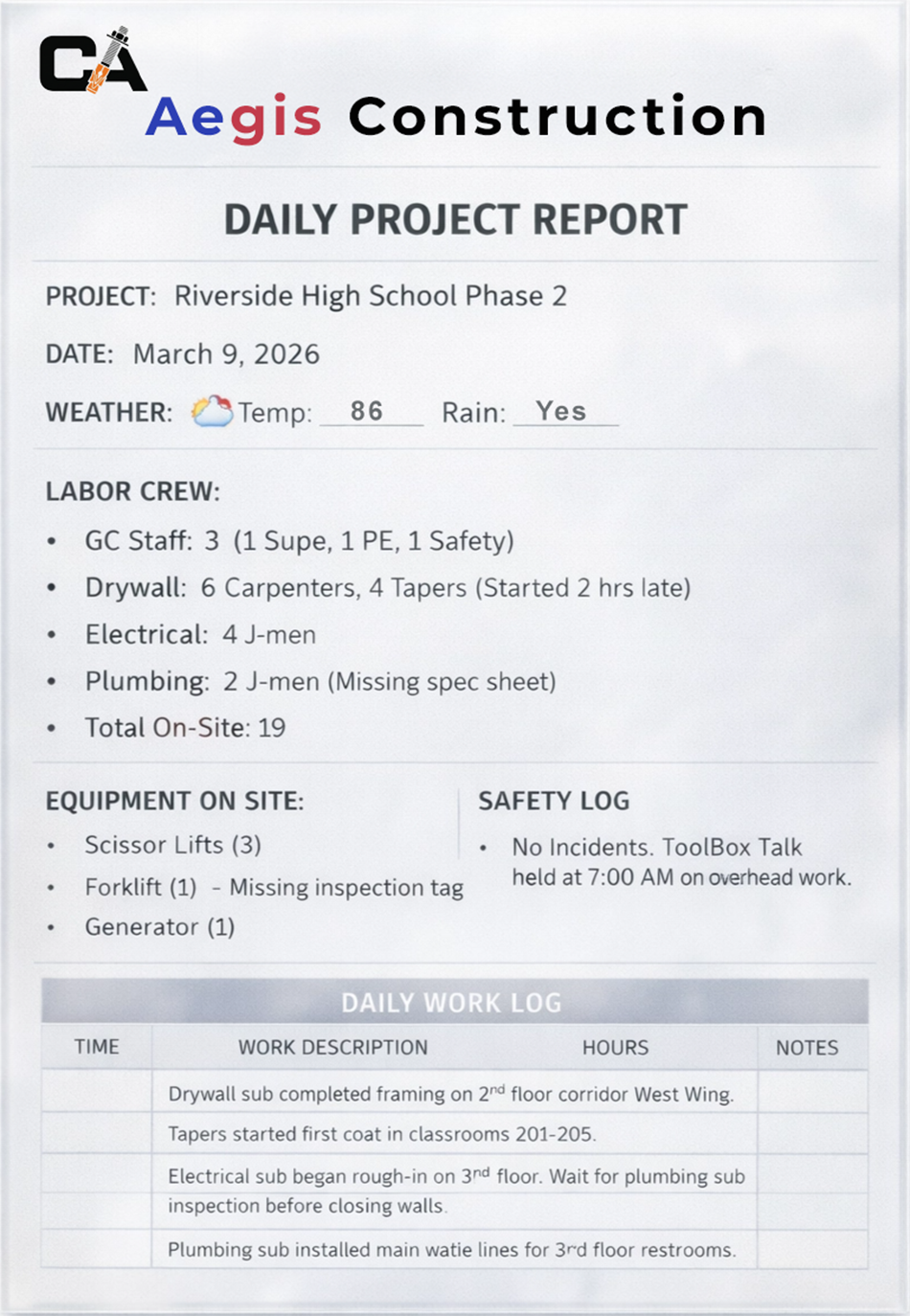
[⚠️ Schedule Risk: Framing]Framers behind on upstairs layout.
[✅ Milestone: Slab Poured]Phase 1 slab fully placed.
[🔍 Spec Deviation: Div 9]Priming classrooms without sanding.
See how it works in 1 minute.
A commercial project set up and processing its first report — start to finish.
If you run commercial projects, you've felt this.
The daily report came in Tuesday. The safety meeting was not in it. The OSHA inspector showed up Thursday.
The drywall went up before the electrical rough-in inspection. You found out when you pulled the report. After.
The PM left in March and took four years of subcontractor knowledge with them. None of it was written down anywhere.
The OAC meeting is Tuesday morning. The report you assembled manually from memory on Monday night.
The Solution
How CostAnchor works.
Step 1
The Context Vault.
Upload your specific Subcontractor Agreements, Milestone Schedules, and Specs. CostAnchor memorizes your exact project rules. No documents yet? CostAnchor still analyzes every report against OSHA regulations and construction standards from day one. Upload your specs when you are ready to unlock spec-specific deviation detection.
Step 2
Daily Risk Detection.
Drop in your daily or weekly superintendent reports. CostAnchor instantly flags safety risks, schedule slips, and spec deviations based on your Vault documents.
Step 3
OAC Brief Generation.
Walk into your Tuesday meeting with a complete, ready-to-send brief built from your verified project history. Every item in it was reviewed and accepted by you or your PM. Nothing in the brief is unreviewed AI output.
Step 4
Owner Reporting.
Generate professional, editable owner reports directly from your verified project history. Filter by date range, edit before sending, and deliver a client-ready progress report without building it from scratch.
VERIFIED BY YOU. NOT ASSUMED BY AI.
Every flag. Every report. Human reviewed.
Every flag cites its source.
When CostAnchor flags a risk or logs a milestone, it shows you the exact sentence from the report that triggered it. You see the evidence before you make any decision.
You control what gets logged.
Every risk and progress item has three options — accept it to your project record, dismiss it if it does not apply, or mark it inaccurate if the AI got it wrong. Nothing enters your project history without your review.
Your reports contain zero unreviewed AI output.
Your OAC briefs, owner reports, and PM handover documents are generated entirely from items you have personally accepted into your project record. If you did not approve it, it is not in the report.
INSTITUTIONAL MEMORY
When your best PM leaves, their knowledge of your subs does not have to go with them.
CostAnchor builds a permanent, cross-project intelligence layer on every subcontractor you work with.
Escalating Risk Tracking
When a sub misses one inspection it is flagged as a risk. When it happens again it escalates. By the third time it is a high-priority alert with a documented pattern. The system tracks so you do not have to.
AI-Proposed Rules
When CostAnchor identifies a pattern — a sub causing repeated delays, a recurring compliance gap — it proposes a rule for your approval. You accept or reject it. Approved rules apply automatically to every future report that sub appears in.
Your Rules, Your Standards
Write your own rules based on your experience. Apply them to a single project or across your entire project portfolio. Your institutional knowledge, codified and applied automatically.
Cross-Project Memory
Sub performance history follows you across every project. A new PM inheriting a job sees every pattern CostAnchor has identified. The knowledge your company has built does not disappear when someone does.
LIVE IN 10 MINUTES. NO IT REQUIRED.
Zero field disruption. Live in 10 minutes.
Your superintendents keep using Procore, PlanGrid, or their standard PDFs. CostAnchor works in the background.
1. The Simple CC
Every new project automatically generates a unique CostAnchor email address. Your superintendent keeps sending reports exactly as they do today — to Procore, PlanGrid, or directly by email. They just add one CC address. No new apps. No new logins. No training. Nothing changes for your field team.
2. The Real-Time Audit
The moment the report arrives, CostAnchor reads it automatically and cross-references it against your context vault documents, OSHA standards, and your subcontractor history. Risks are flagged, milestones logged, and patterns checked against every previous report on the project.
3. The Instant Brief
Within minutes, the results land in your inbox. Log into the dashboard when it suits you — Monday morning works fine. Accept the risks that matter, dismiss what does not apply, and generate your OAC brief or owner report from your verified project history in under three minutes.
ROI
The math is simple. Calculate your protected margin.
Margin Readout
Schedule Margin Protected:+$6,000
Rework Costs Avoided:+$5,000
Total Margin Protected:
$11,000 / month
CostAnchor Starter Tier: $1,200 / month. One caught spec deviation typically covers 6 to 12 months.
YOUR DATA STAYS YOURS
We only collect what we need to read your reports.
Getting started takes only your email and a password. No financial data. No labor rates. No company information required. The only documents CostAnchor ever processes are the operational specs and field reports your subcontractors already have access to.
Your project data is never used to train AI models. All processing happens through secure, zero-retention endpoints. When you close your account, your data is deleted automatically — no request needed.
The Context Vault Protocol
What stays on your servers
- Master Financial Contracts
- Internal Labor Rates & Margins
- Personally Identifiable Information (PII)
What goes in the Vault
- Division Execution Specs
- Milestone Schedules
- Subcontractor Scopes of Work
- Daily Superintendent Reports
Honest pricing • Cancel anytime • Zero IT integration required.
Starter
$1,200/ month
For GCs running 1 to 2 active commercial projects.
Includes
- Up to 2 Active Projects
- Full Access to the CostAnchor Risk Engine (Daily Log Analysis, Schedule & Spec Matching)
- Unlimited Context Vault Uploads
- Automated Project Briefs & PM Handover Reports
One caught spec deviation typically covers 6 to 12 months of your subscription.
Get Started
Instant setup • Cancel anytime
Growth
$2,000/ month
For GCs running 3 to 5 active commercial projects.
Includes
- Up to 5 Active Projects
- All Platform Features Included
- Multi-Project Subcontractor Tracking (Aggregates performance data, delays, and historical risk rules across all 5 active sites seamlessly)
- Portfolio-Wide Performance Memory
One prevented sub delay on a critical path item typically covers your annual subscription.
Get Started
Instant setup • Cancel anytime
Scale
$3,200/ month
For GCs running 6 to 8 active commercial projects.
Includes
- Up to 8 Active Projects
- All Platform Features Included
- High-Volume Portfolio Optimization (Designed for dense operational data across up to 8 distinct management teams)
- Dedicated Setup Support (Direct access to our founding team to ensure your active rules match your current corporate guidelines)
Portfolio-wide risk visibility that eliminates margin fade across your active job sites.
Get Started
Instant setup • Cancel anytime
Enterprise
Custom Pricing
For regional and national general contractors.
Includes
- 8+ Active Projects
- All Platform Features Included
- Custom Corporate Integrations Available (Tailored data pipelines or specific enterprise reporting setups as required)
- Dedicated Account Support
- Usage-Based Scaling Options
Running more than 8 active projects? Contact us for Enterprise pricing tailored to your project volume.
Still have enterprise or technical questions? Book a Quick Call.
Frequently Asked Questions.
Straight answers on security, workflow, and deployment.
Do my superintendents have to download a new app?
No. CostAnchor requires zero field retraining. Superintendents simply CC your project's unique CostAnchor email address when they send their standard daily Procore, PlanGrid, or PDF reports.
Does this replace our existing project management software?
No. CostAnchor sits on top of your existing tech stack as an automated risk intelligence layer. We ingest the PDFs your current systems already generate.
Is our proprietary data used to train public AI models?
Absolutely not. We use secure, zero-retention enterprise API endpoints. Furthermore, our Data Minimization protocol means we only process field execution specs, keeping your master financial contracts entirely off our servers.
Are we locked into a long-term contract?
No. Our Starter and Growth tiers are transparent, month-to-month subscriptions designed to align with your active seasonal project load. You can scale up or down as needed.
What if my superintendent writes short or sparse daily reports?
CostAnchor still produces meaningful output. When standard items — like a documented safety meeting or an inspection record — are missing from a report, the system flags the absence as a compliance risk with the relevant OSHA or construction standard cited. You see what was not reported, not just what was. Catching missed inspections and documentation gaps helps prevent margin fade on large-scale commercial projects. As context documents are uploaded and project history builds, the output becomes more specific to your project.
How does CostAnchor handle AI errors or incorrect flags?
Every flag includes the exact sentence from the superintendent's report that triggered it. If a flag is wrong, you dismiss it and mark it inaccurate — the system learns from that feedback. Nothing gets logged to your project record without your review, and nothing gets published without your approval. Your OAC briefs and owner reports contain only items you have personally accepted.
Does CostAnchor track subcontractor performance across multiple projects?
Yes. This is one of CostAnchor's most significant capabilities. Sub performance history builds across every project. When the system identifies a pattern — a sub repeatedly missing inspections, or causing schedule delays — it proposes a rule for your approval. Approved rules can apply to a single project or across all your projects. That institutional knowledge stays in the system regardless of PM turnover.
Can we create our own rules for how the system evaluates our reports?
Yes. In addition to AI-proposed rules, you and your PMs can write your own rules based on your experience with specific subs, project types, or risk thresholds. Rules can be scoped to a single project or applied portfolio-wide. Your rules, your standards, applied automatically to every report.
What happens to our data if we cancel?
Your account data is deleted automatically when you close your account. No request needed. We do not retain project records, context vault documents, or report history after account deletion. You can also export your accepted project history before closing your account.
See what CostAnchor catches on your next project.
No lengthy onboarding. No field retraining. Live in 10 minutes.
CostAnchor for Commercial General Contractors.